Fall Release Preview: Unlock Even More With Additional API Key Functionality

As the weather cools down, our Fall release is just heating up! We’re bringing you a sneak peek into a bunch of new features that will be available for users in the next couple of months.
At Real Estate Webmasters, we’re always looking for ways to improve user experience and our platform. Our next release will see a significant update to APIs—giving you more control, greater data access, and seamless integrations to power your custom workflows.
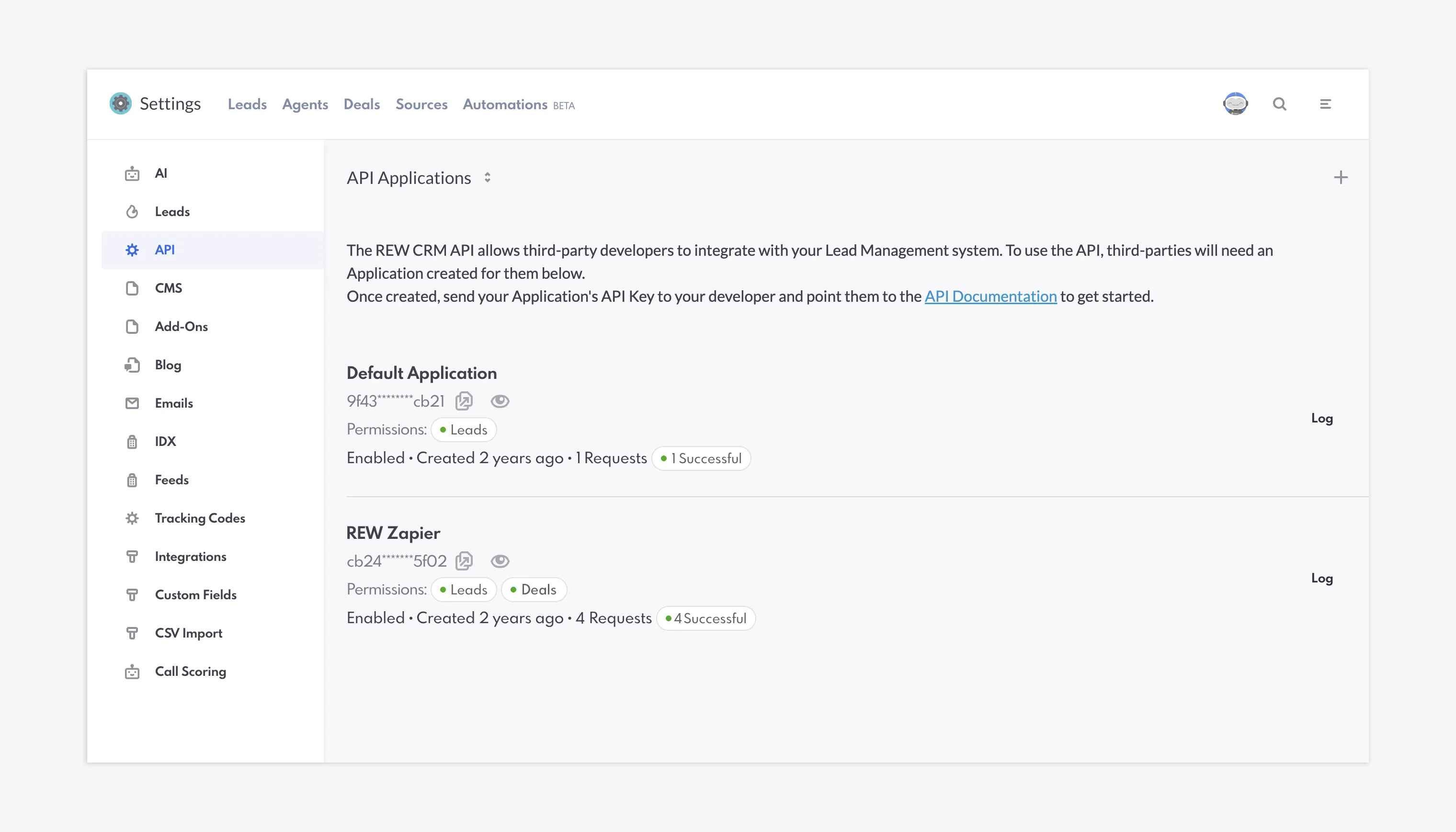
API Settings in the REW CRM
Let’s jump right into what’s changing!
Table of Contents
Crash Course: What’s An API And How Does It Work?
An API—which stands for Application Programming Interface—key is a code that gives another application permission to be used. Sometimes it is likened to a server at a restaurant that moves between you, the customer, and the kitchen by helping you order your food off the menu, or it might be referred to as a passport, as it grants access.

How APIs work
Essentially, it’s a string of unique code to authenticate you as the correct user. When you add a key and run an application, the API key is delivered to the software and then verified. If correct, then the software will run on the server. If not, then your access will be blocked. API keys are used because they enable dynamic syncing, with data being readable and recorded across platforms.
Our CRM has the functionality to add API keys directly to your website in order for you (whether you are a single user, a developer, or a program) to integrate third-party software. For example, you might use another tool to keep track of your leads, or use software to collect data for several of your sites if you have them, or add certain AI tools to your website—something that is becoming increasingly popular!
In short, an API key sounds pretty complex, but the idea is simple: it works as a password for you to verify your identity on additional applications.
Expanding Your Connectivity: Introducing the New Deals API
Previously, endpoints were relatively restricted, but we’ve opened these up to give you more data regarding your leads. But most significantly, we’re introducing our new Deals API, which provides users with even more flexibility.
The Deals API is included in the regular settings. When you add a new application, there will be a Permissions section where you can select from Deals and Leads. Additionally, you can open an API that covers both Deals and Leads at the same time, or just one.
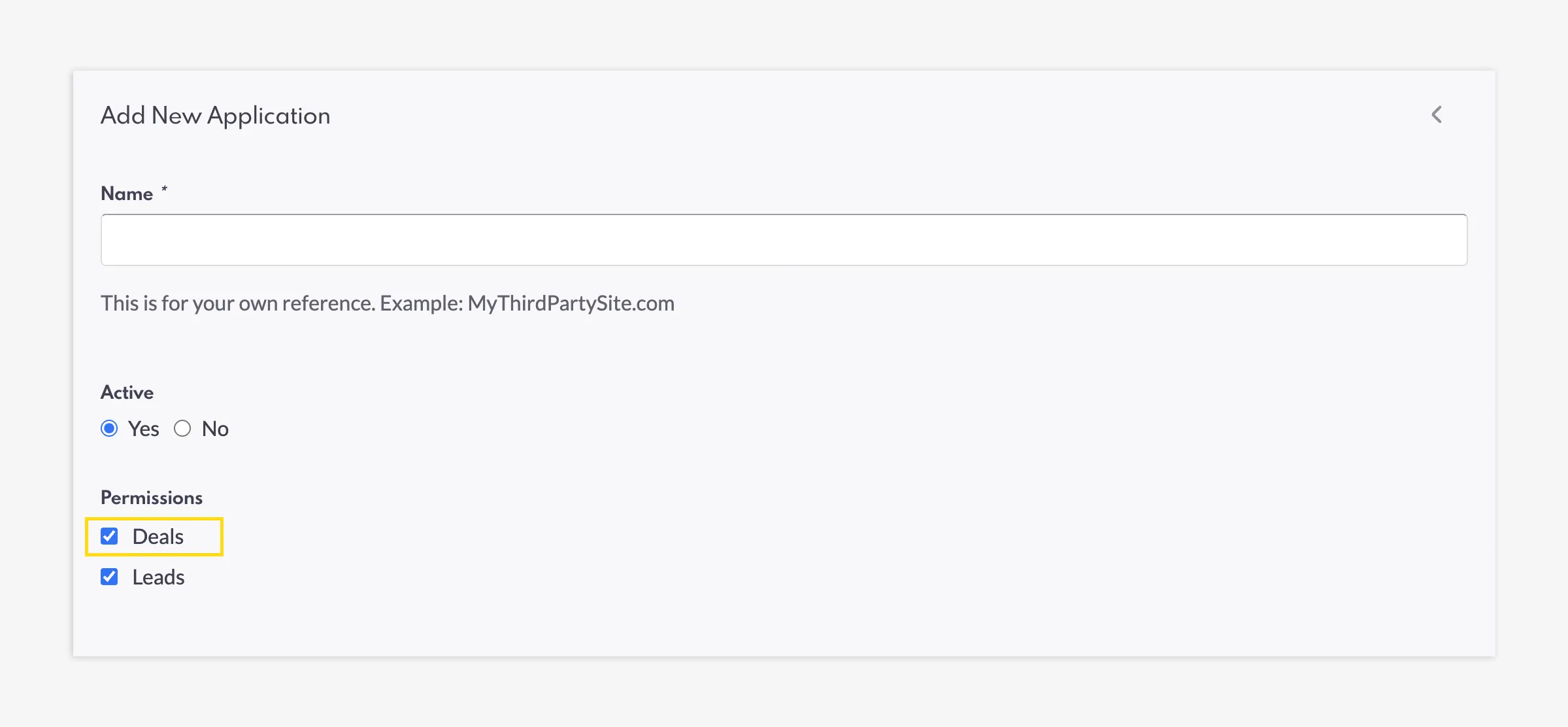
New Deals Permission when adding a new API Application
As mentioned above, AI tools are quite popular. By integrating, you can have Artificial Intelligence manage, sort, and/or provide insights on your deal information—saving you time, but also providing you with insight on something you might’ve missed.
Within each new API Application, you have the option to select Push Events, which notify the Destination (your third-party software) when a selected event occurs on your website. These include Saved Searches Created, Form Submissions, and other similar metrics. With the new Deals feature, you can now also track Deal Created and Deal Updated.
Better Integrations with Zapier
Connectivity is key, and we want to ensure you can build the tech stack that works best for you. We’re excited to share that our new Deal API feature in the CRM is fully compatible with Zapier.
This makes it easier than ever to act as a bridge between our platform and the hundreds of third-party apps supported by Zapier, allowing you to automate your data flow without the need for heavy custom development.

Connect Deal data from Zapier directly to the REW CRM
Greater Lead And Deal Data Availability
Alongside the new Deals API, we’ve expanded the Leads API with a suite of new endpoints. While you’ve always been able to create, retrieve, and update lead data, now we can do even more.
With this update, you have the ability to get a hold of a number of your leads (up to 500 at once) with the List All Leads integration. This provides you with access to even more detailed data—a list of leads in a single request—giving you a more comprehensive view of your lead lifecycle. But this is also beneficial if you’re using an application that does not store data in an external database.
This is also in accordance with Deals, which allows you to integrate Deals, Deals Appointments, Deal Offers, and Deal Tags.
Closing Summary
It’s all about connectivity—and adding the additional features you want, when you want them, and giving you full control.
To summarize, our updates are all about putting you in the driver’s seat. Whether you are building an accounting integration or tracking transaction history outside of our platform, these APIs provide the flexibility you need to customize your data experience.
And if you ever get stuck or need some help, there is further documentation in the backend for your reference. Plus, your Account Managers are always on standby!
Fall Release Preview: Unlock Even More With Additional API Key Functionality FAQs
What is the new Deals API and what does it do?
The Deals API is a new feature that provides more flexibility by allowing you to integrate and track deal information in third-party software, when connected properly.
Is Real Estate Webmasters' Deals API compatible with Zapier?
Yes, our new update to API keys allows you to integrate Deals with Zapier.
Are there any new security features on the API settings page?
Yes, we have introduced enhanced masking for API keys on the settings page, allowing you to collaborate or share your screen more securely without exposing your full keys.
What is the difference between a regular API Application and an Outgoing API?
An API is for other tools, platforms, or software to read your data. Your Outgoing API allows your site to read others’ data.
My websites are linked to an API key and data isn’t flowing/working correctly. Why is that?
You may have to add an Outgoing API to your other website to establish a two-way sync. By nature, APIs are one-way, so you must manually configure outgoing and incoming API endpoints on both connected systems.