This year's Burnett v. National Association of Realtors® (NAR) ruling has sent shockwaves through the real estate industry, forcing real estate professionals to quickly adapt to a new reality. With buyer compensation structures changing significantly, staying competitive and compliant became more challenging. REW CRM's Buyer Compensation Tool is designed to help you navigate these changes by effectively communicating buyer incentives in the wake of the ruling.
The Case Aftermath
The case conclusion has understandably raised concerns about transparency in buyer compensation. Without the Compensation Tool, agents may face countless individual conversations to address incentive inquiries. This could overwhelm workflows, disrupt efficiency, and strain the trust built with clients and other stakeholders.
At Real Estate Webmasters, we recognize these challenges and are committed to supporting agents through this transition. Our goal is to help you stay compliant and ensure clients receive clear, up-to-date information.
In this spirit, we'd like to give a special shoutout to our client and friend Gary Ashton, CEO and Owner of Ashton Real Estate Group. His insights were instrumental in developing this tool, and we are grateful for his feedback in enhancing transparency in buyer compensation.
How the Compensation Tool Works
The Buyer Compensation Tool is automatically enabled on our latest Renaissance platform and can be accessed by Admins. It allows you to label and display buyer commissions directly on your listings, whether you prefer to show a dollar amount, percentage, or custom text. This flexibility enables you to adjust the displayed information to meet the specific language or terms required by your MLS or local regulatory bodies.
It's important to note that you can only add compensation details to your own listings on your website. We do not feed this information back to MLS data, nor is it available through APIs or any other distribution methods. While many MLS boards have already approved our Compensation Tool, you should still obtain permission from your MLS boards to ensure full compliance.

Adding a compensation amount on a specific listing.
Add Compensation to Your Listings
Admins can add compensation details to listings with just a few steps. Here's a quick guide on how to add this information to a listings page:
1. As an Admin, go to REW CRM and click "Settings."
2. Navigate to the "IDX" section and select the "Compensation" tab at the top.
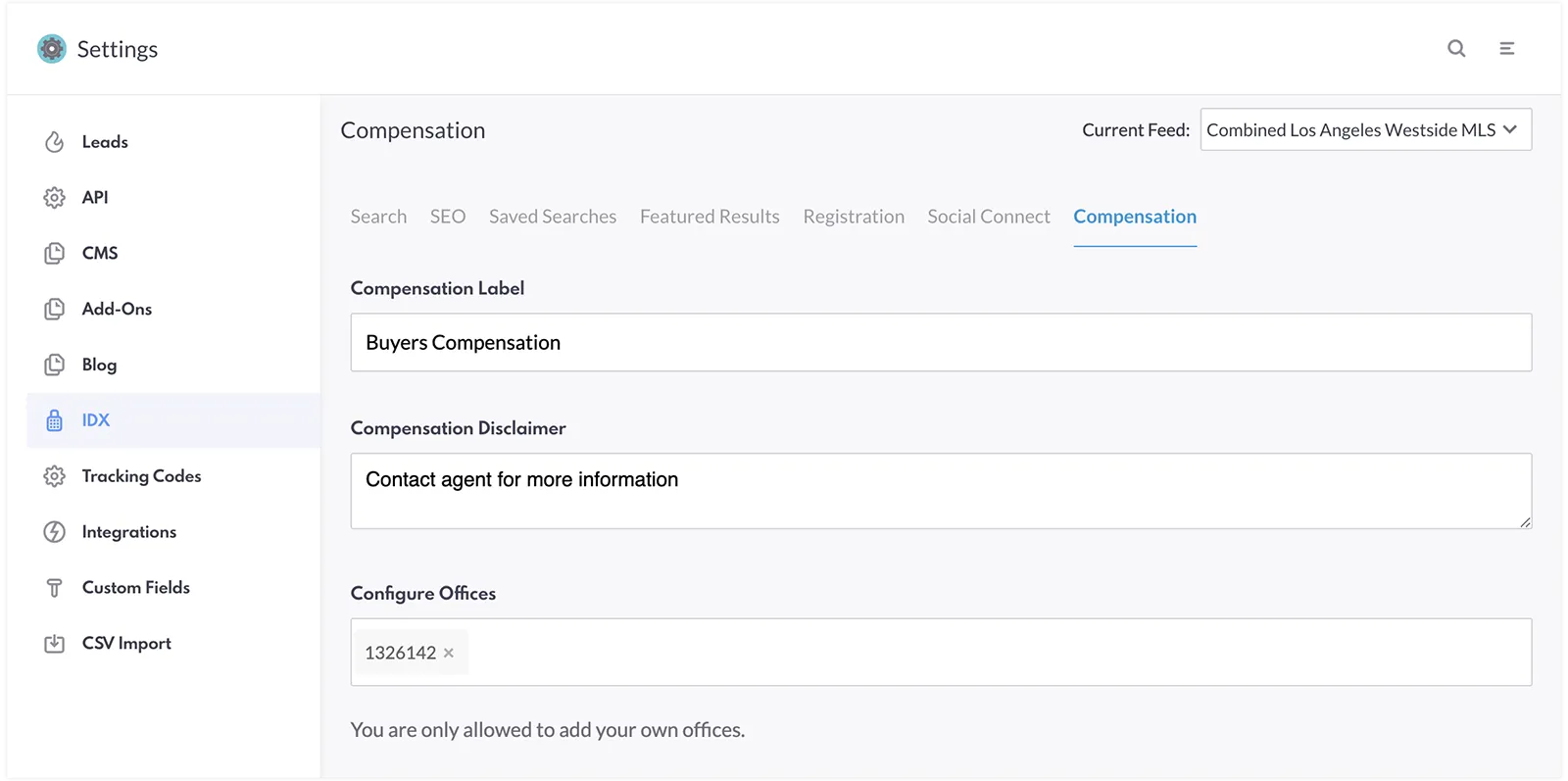
3. Fill out the "Compensation Label.".
4. Under "Configure Offices," select the offices you are responsible for.
5. Return to the REW CRM menu and select "Listings."
6. On the left side of the screen, click "Compensation."
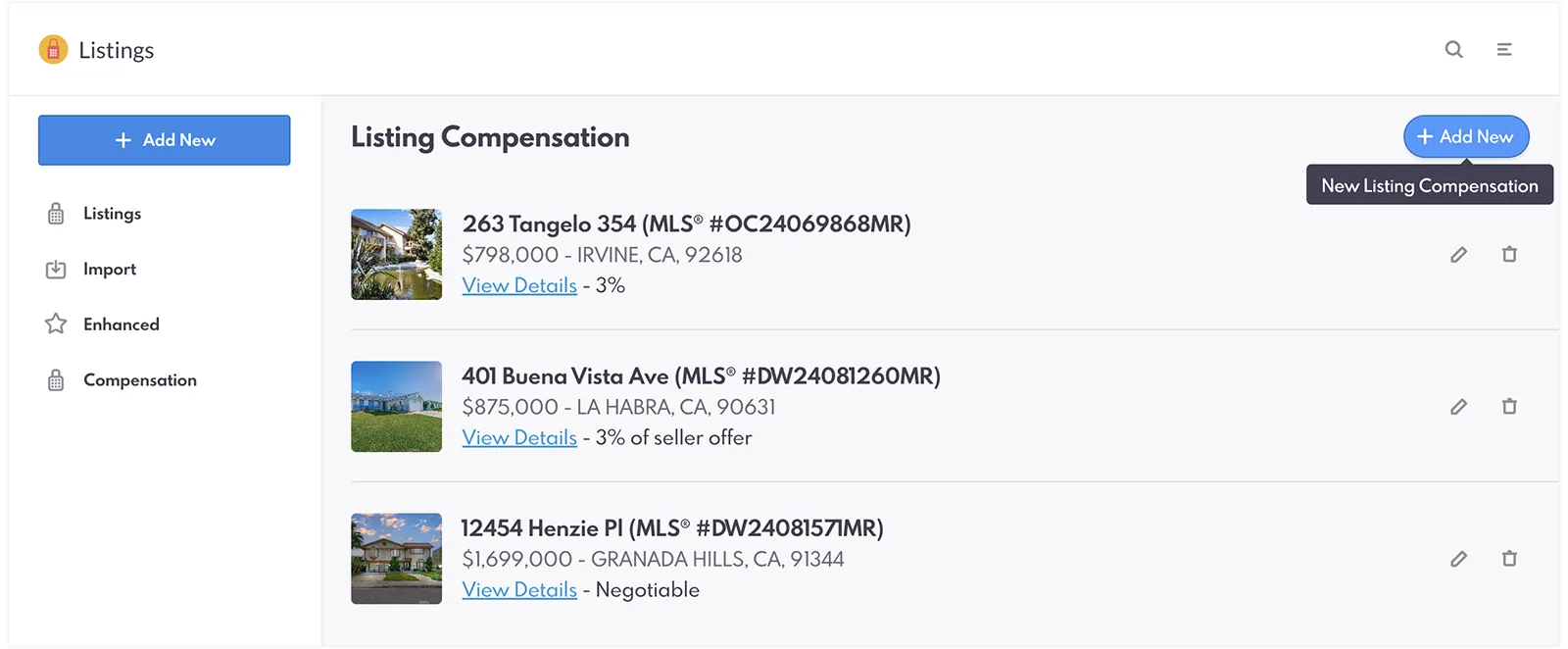
7. Click the "+ Add New" button.
8. Choose the Feed.

9. Find the specific listing you wish to update.
10. Click "Save."
11. Add a "Compensation Amount", then "Save".

12. Finally, visit the listing's page to confirm the compensation information is displayed as intended.

Set up Agent Permissions
As an Admin, you can give your agents access to the compensation tool by doing these steps:
1. Log in to REW CRM.
2. Navigate to the "Company" page by clicking the menu logo on the top right of the screen.
3. Choose the agent you want to give access to the Compensation Tool.
4. Open the drop down menu beside "Agent Summary."

5. Click "Permissions" and head to "Listings Privileges."

6. Check the "Listing Compensation Tool" and click "Save."
7. The agent must log in to their profile and go to "Preferences."

8. The agent will need to scroll down to the field stating their MLS Agent ID and input their ID.

9. Click "Save."
Head over to REW Academy to watch the complete walkthrough of how to set up your Compensation Tool on REW CRM.
The Buyer Compensation Tool Video
The instruction video on how to set up and leverage the Buyer Compensation Tool.
Best Practices To Follow
The Buyer Compensation Tool is designed to help real estate professionals promote transparency even amid the changes the market is experiencing. To get the most out of this feature, it's important to follow these best practices to guarantee clarity, compliance, and efficiency.
- Stay Informed on MLS Rules- Always check your MLS boards' rules regarding commission display. Stay updated on changes and ensure compliance before adding compensation details.
- Only Add Your Own Office and Listings- Remember to use the tool exclusively for your own listings to maintain compliance.
- Use Clear and Consistent Labels- Make sure that your compensation details—whether in dollar amounts, percentages, or custom text—are easy for clients to understand.
- Review Listings Regularly- Periodically update your listings to reflect any compensation or market conditions changes.
- Keep Communication Consistent- Ensure that any compensation details on your website match what you communicate to clients or agents when you speak with them.

Utilize the Buyer Compensation Tool on an agents' own listings and feed.
The Benefits of the Compensation Tool
The Buyer Compensation Tool was created to streamline your operations and enhance your client interactions. By integrating this tool, you can address the changes in showcasing buyer compensation and set your listings apart.
- Enhanced Transparency- Clear visibility into compensation builds trust and helps prevent any misunderstandings or disputes later in the process.
- Streamlined Communication- With compensation information readily available on your listings, you reduce the need for repetitive explanations and one-on-one conversations. This saves you time and promotes smoother transactions.
- Compliance Flexibility- The tool allows you to customize compensation details based on your boards' specific rules. This flexibility ensures that you remain compliant, regardless of how your MLS or market requires compensation to be displayed.
By leveraging these benefits, you'll be better positioned to manage your listings effectively and foster stronger client relationships.

The buyer compensation details showcased on the listings page.
Join the Conversation and Learn More
We invite you to join the REW Forum to engage in the ongoing conversation about the Buyer Compensation Tool and other industry topics. This is a great space to connect with fellow industry professionals, share insights, and stay updated on our latest projects.
If you're interested in learning more about our products or how they can benefit your business, please don't hesitate to contact us directly. For our existing clients, we encourage you to reach out to your Account Managers with any questions or for additional support. We are always here to support you and your team!
Buyer Compensation Tool FAQ
How does the Buyer Compensation Tool work?
This tool allows you to add compensation details to your listings on your Renaissance website.
What formats can I use to display compensation?
You can display compensation as a dollar amount, percentage, or custom text depending on your preference and regulatory requirements.
Can I add compensation details to listings from other offices?
No, you can only add compensation details to listings from your own office to maintain compliance.
How does using the Compensation Tool benefit my business?
It enhances transparency by clearly showing compensation details, reduces the need for repetitive explanations, and helps you remain compliant with MLS rules.