How An llms.txt File Can Help You Show Up In AI Search Results

The tech world in 2026 is changing, and it can sometimes feel a bit overwhelming to keep track of—and keep up with!—all of the new features and functions. One of the most significant developments recently has been the quick integration of AI across various search engines and the surge in new AI tools.
Add an llms.txt file to your Renaissance website
Real Estate Webmasters is preparing to roll out a few exciting features for our summer release. To help you keep up with the fast-paced world of technology, we’re adding the option to incorporate an llms.txt file on your site—which lays out a map of your site for AI to ensure the information gathered is both relevant and correct, with the goal of popping up more frequently in results.
Table of Contents
LLMs vs. AI Tools: What’s The Difference?
AI is still new, and it can be difficult to understand all of the terminology—as well as its capabilities. For many, it can be a little bit confusing to understand the language, but these terms are easy to break down.
An LLM (which stands for “Large Language Model”) is a piece of software that generates text based off of existing source material, which has been condensed into what are called “datasets” (condensed files of data). LLMs “predict” what will come next based on the information that they have and what direction you provide them with. Examples of LLMs include GPT-4o/GPT-5, Claude Opus/Sonnet, and Gemini 2.5. In short, these are the models behind everything.
In contrast, AI tools are implemented by the LLMs and are the “vehicles” that people use to search for and find information. For example, Claude is an AI tool by Anthropic and ChatGPT is run by OpenAI, while Gemini is accredited to Google.
A Brief Guide To llms.txt
Google has crawlers (also called “spiders” or “Googlebots”), which are bots that scan and read the information on your website. By doing so, they can index your pages, and this is also the basis of how you can show up in search results.
A robots.txt file can be added to your website, the purpose of which is to tell Google’s bots the most pertinent information about you, telling the crawlers what they can access and what they should avoid. This acts like a roadmap, so that search engines can understand your site better, spending more of their very limited time looking at your site’s most relevant pages.
An llms.txt file functions similarly in the sense that it is also a map; it provides an overview of your site's key content. These, like robots.txt, are written in a Markdown document, which is a simple language that can convert easily into HTML. This file is written with a similar outcome in mind: that AI tools can read this, understand your website, and pull the most relevant information from it at a much faster speed.
Because this is still an experimental feature, there is some freedom when it comes to writing your llms.txt file. However, they should be written in Markdown formatting, with # (hashtags) denotating headings, * creating italics, and ** being used for bold text. More information regarding Markdown basics can be found here.
Your llms.txt file should include the following:
- A short description (2-3 sentences) about who you are as a business
- The services you offer, divided into parts (i.e. IDX search/services/resources)
- Your name, contact information, and office location
Please keep in mind that the llms.txt format is still in the early stages of development and usage. Although there is increasing momentum behind AI-optimized site architecture, its adoption is currently inconsistent across different AI tools and search engines. As llms.txt continues to grow, it is recommended to refine this file over time, with the perspective that this is a forward-looking measure to help ready your site for the ongoing shift toward AI-driven search.
Why Use llms.txt With REW Sites?
Real Estate Webmasters' websites will be adding the llms.txt file feature to the CRM in our upcoming summer release. At a time when showing up in AI results is becoming more and more significant for businesses, the goal of this new feature is to stay ahead and provide innovative solutions that meet shifting demands.
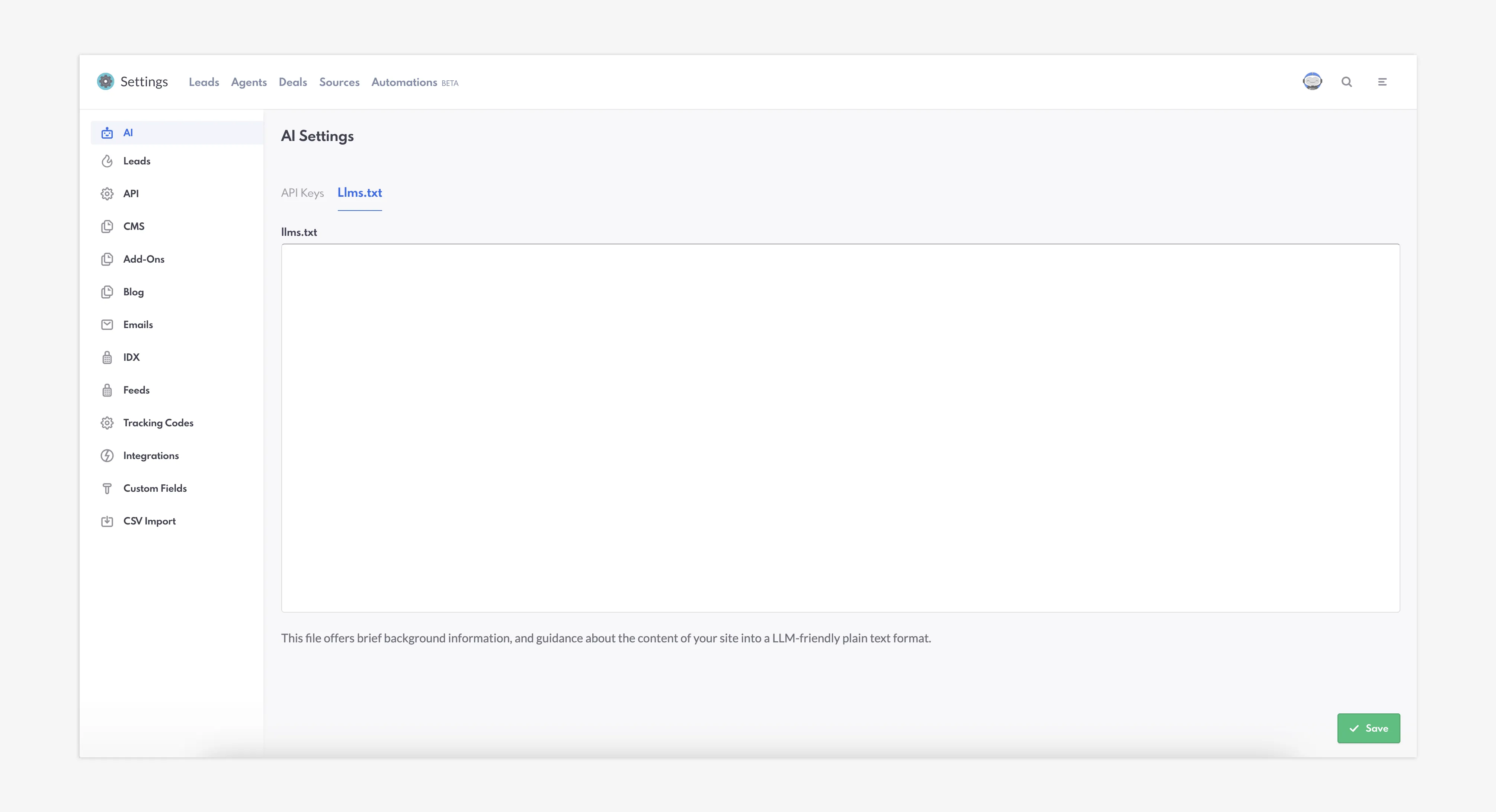
LLM-friendly plain text format in the REW CRM
Your llms.txt file should contain information about your business, your desired client base, the market and your location, your areas of focus, and your important pages. This “roadmap” is designed with the intention of helping AI tools get a better understanding of your website.
In a changing landscape where more and more people are using AI search methods, trying to show up in AI results can produce tangible (and often significant) benefits. It’s pretty simple: by assisting in greater opportunities for your website’s exposure across multiple platforms, you can attract more of the leads that you want, which then boosts your business.
Closing Summary
Ultimately, the llms.txt file may make it easier for AI tools to read your site. By doing so, it can be possible for you to pop up across search tools that are steadily rising in popularity around the world. This exciting feature will be located within the AI tab in the Settings section of the backend—set to go live with our summer release.
How An llms.txt File Can Help You Show Up In AI Search Results FAQs
What is an llms.txt file?
An llms.txt file is a page with code on your website that tells LLMs more about you.
How do robots.txt files and llms.txt files differ?
A robots.txt file is specific for Google's crawlers, while an llms.txt file targets Large Language Models, such as OpenAI.
Why should I use an llms.txt file?
An llms.txt file can help to quickly deliver the most important information about your website to LLMs—meaning that popping up in search results is far more likely.