How to use NORÉ To Rank Higher (And Make Your Pages Look Good At The Same Time)

We’ve been talking a lot about SEO especially as it pertains to AI. More specifically, AI has significantly changed the way a lot of people search for information. Though we can never be completely sure of what will happen in the future, there is the possibility that AI tools could overtake search engines as the most prominent way to look things up.
Regardless of what will happen, the landscape has been changing, and SEO is evolving with it. That’s one of the reasons why Real Estate Webmasters has been developing new tools to help your site stay relevant. One of our newest features is NORÉ—and it has the capability to help you with both design and SEO.
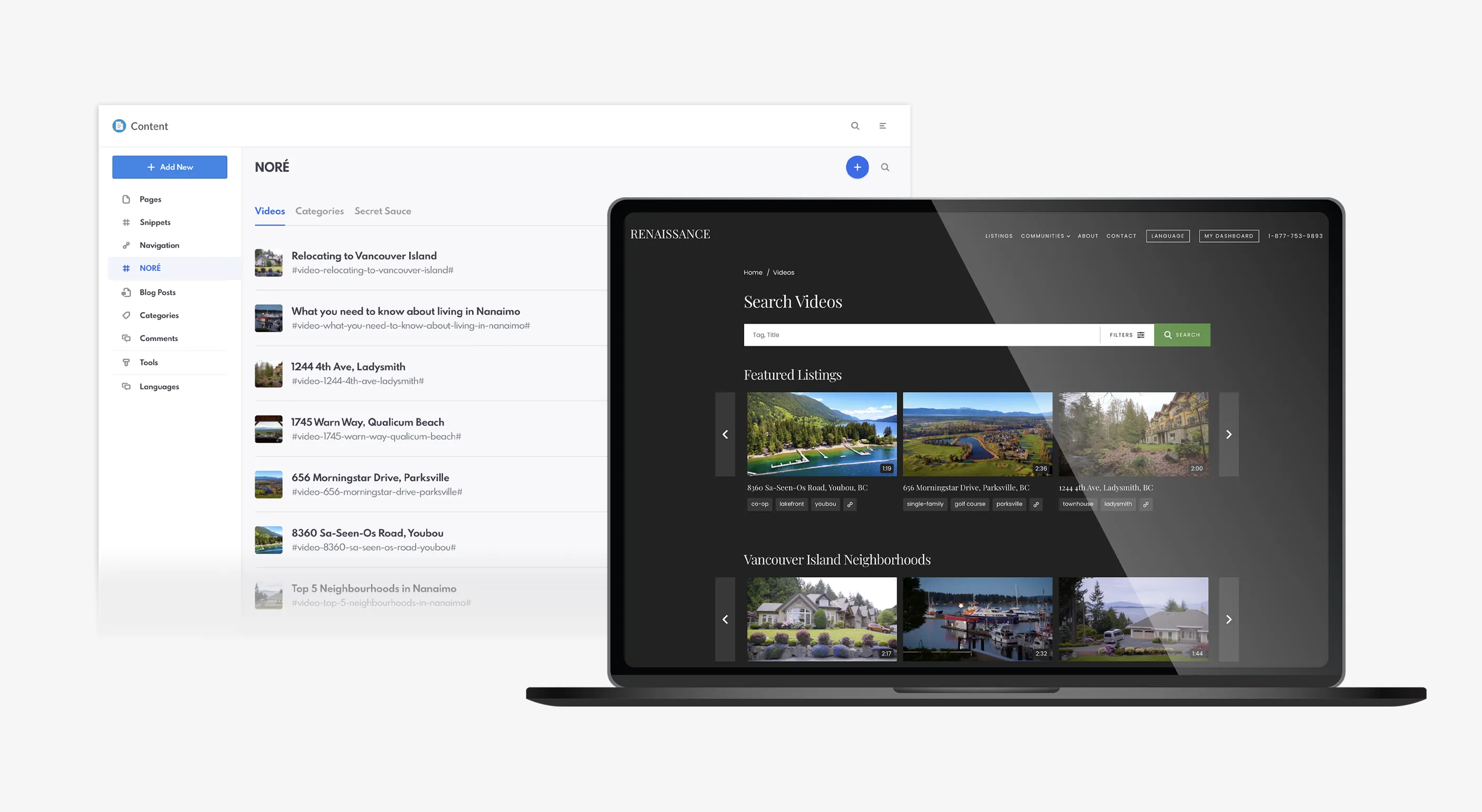
Real Estate Webmasters' SEO tool for videos: NORÉ
Table of Contents
A Crash Course In NORÉ
For those unfamiliar with NORÉ (which stands for [Red Streaming Platform That Starts With N] Of Real Estate], this is our newest SEO tool, available in our summer release. It’s a simple concept that started with the idea to better showcase videos on REW sites, and transformed into a powerful SEO tool that integrates AI.
By uploading video transcripts to NORÉ, you can create new CMS pages that can rank, as well as generate new blogs, CMS pages, and social media posts, making it easy to “spread” your content across multiple platforms. For a full tutorial on NORÉ and its features, view our full blog post here.
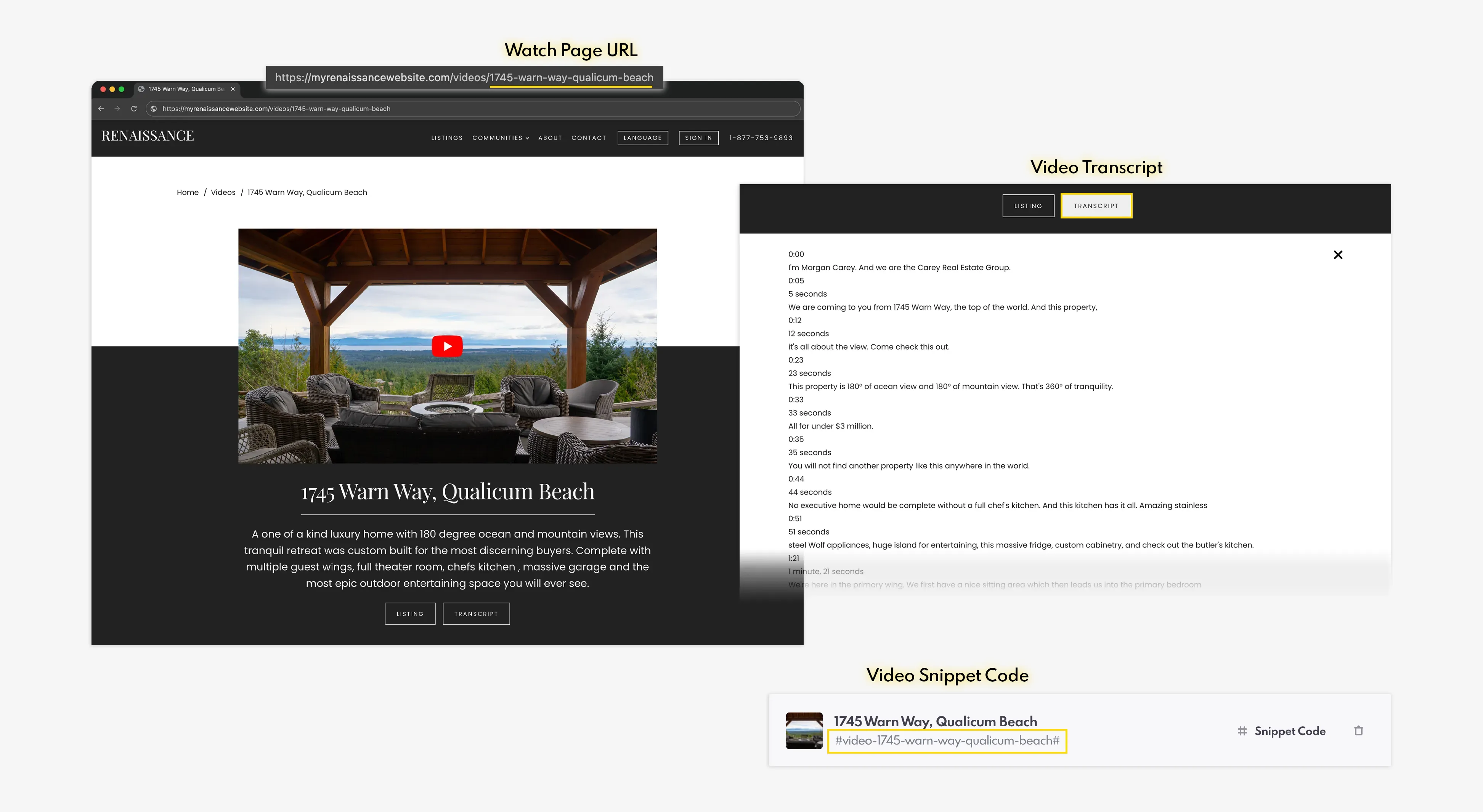
An example of a video's Watch Page, transcript and snippet code from NORÉ
NORÉ does a lot: it’s both a content generator and a design element that you can add to your pages—making it an incredibly powerful and useful tool that we’re really excited about!
Categories For NORÉ
An integral part of NORÉ is the Categories aspect. You can find this tab between “Videos” and “Secret Sauce.” In order for NORÉ to work, you will have to create a new Category. This will then create your first carousel on your Videos (yoururlhere.com/videos/) page.
Your Categories could be anything you want them to be—such as featured listings or tours, area information, livestreams, neighbourhoods, and more. Categories also activate the Video Search Feature, which (like its name suggests!) allows site visitors to search all of your active videos.
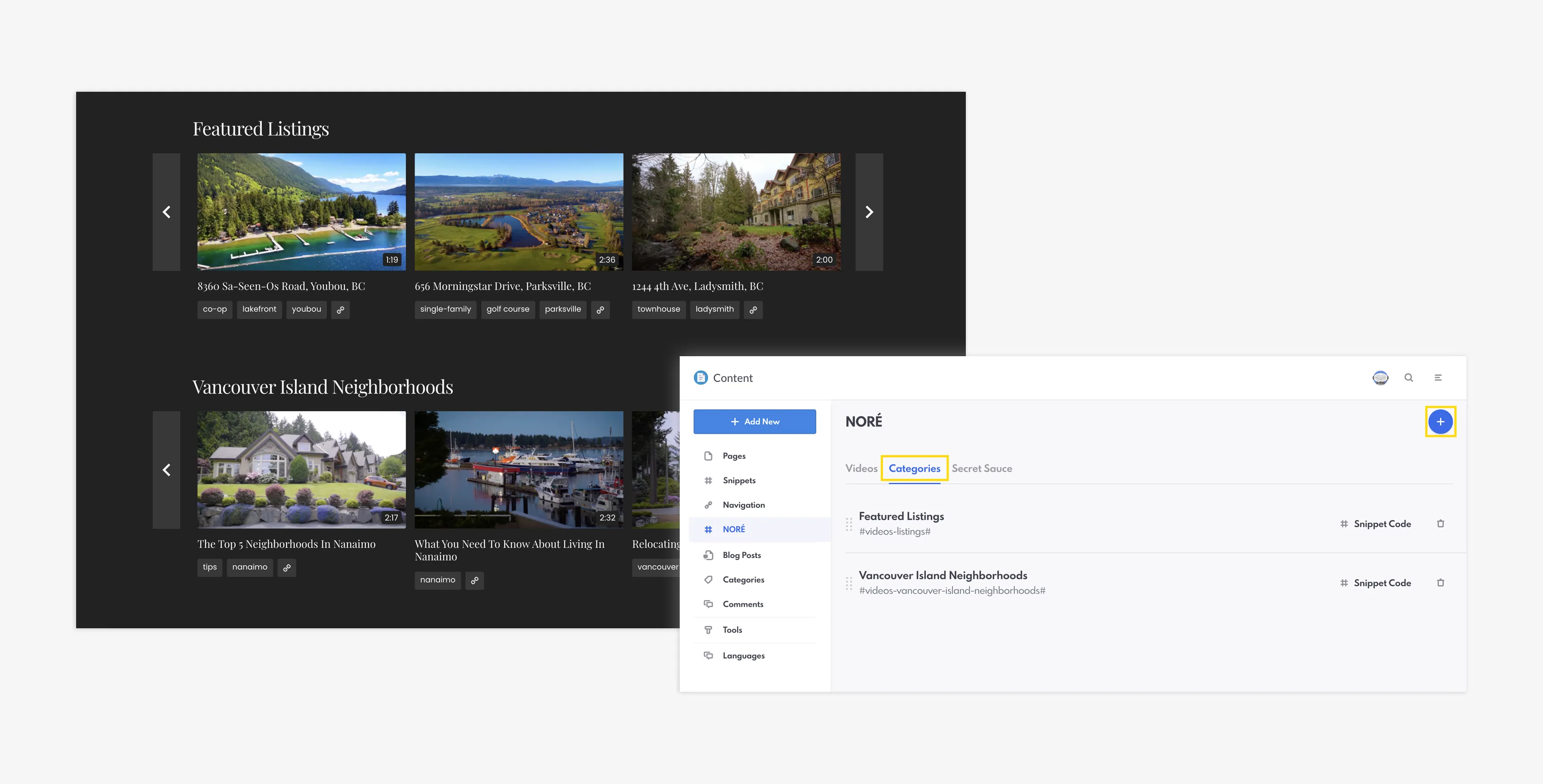
NORÉ categories on the Renaissance website and in the REW CRM
To create a new Category, select NORÉ within the Content section of the backend. Then, select the “Categories” tab. Click the blue “+” button to create a new Category. Give it a title and click “Save.”
Generating Content From Your Transcripts
NORÉ is an SEO tool that works in conjunction with generative AI. One of its most prominent capabilities is that it can create completely original content from uploaded video transcripts.
By leveraging generative AI, NORÉ allows you to transform these transcripts into a variety of assets tailored for different channels, such as blog posts, social media updates for platforms like Facebook and LinkedIn, and custom CMS pages. This capability is the key to a “distributed content strategy,” ensuring your expertise is visible wherever your clients are looking. In an era of “Search Everywhere Optimization,” being present across multiple authoritative resources—from search engines to AI toolss—is no longer optional. Instead, it’s a requirement for maintaining authority and trust.
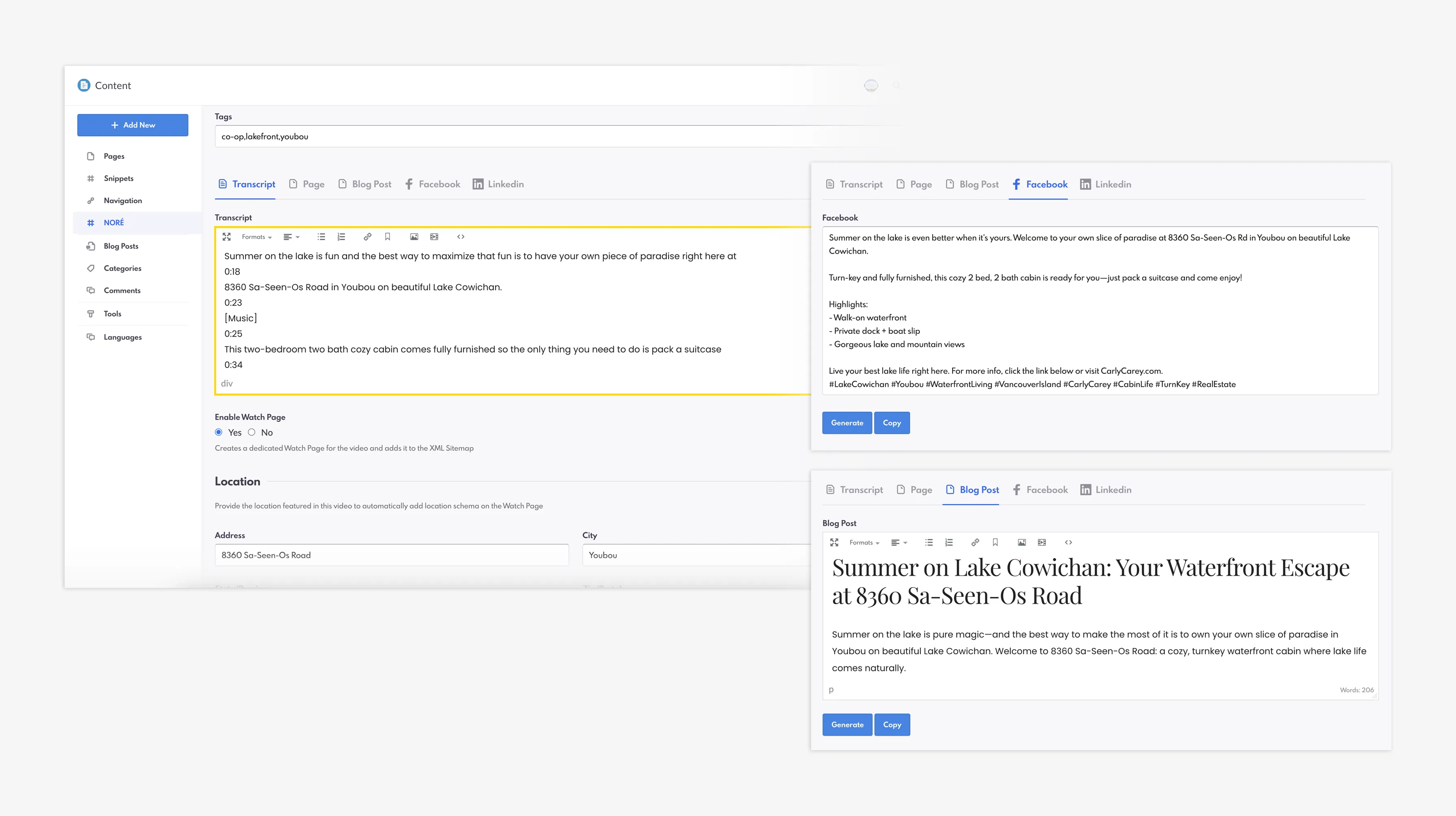
Using a video's transcript to generate AI content for Facebook and a blog post
It is important to note that NORÉ does not host videos on the platform. Instead, videos must be uploaded to either YouTube or Wistia. Then, the transcript can be transferred over to NORÉ.
Boosting Discoverability with Watch Pages and Schema
Another one of NORÉ’s most exciting features is its ability to create original pages alongside original content.
Your Watch Page is your secret weapon for SEO. While standard video pop-ups are designed for user interaction, a Watch Page is built with the intention for Google and AI bots to crawl, understand, and index/recommend your content. When you enable a Watch Page, NORÉ automatically structures your transcript data for better search indexing—giving you a leg up over your competitors and helping spread your awesome content across a variety of channels.
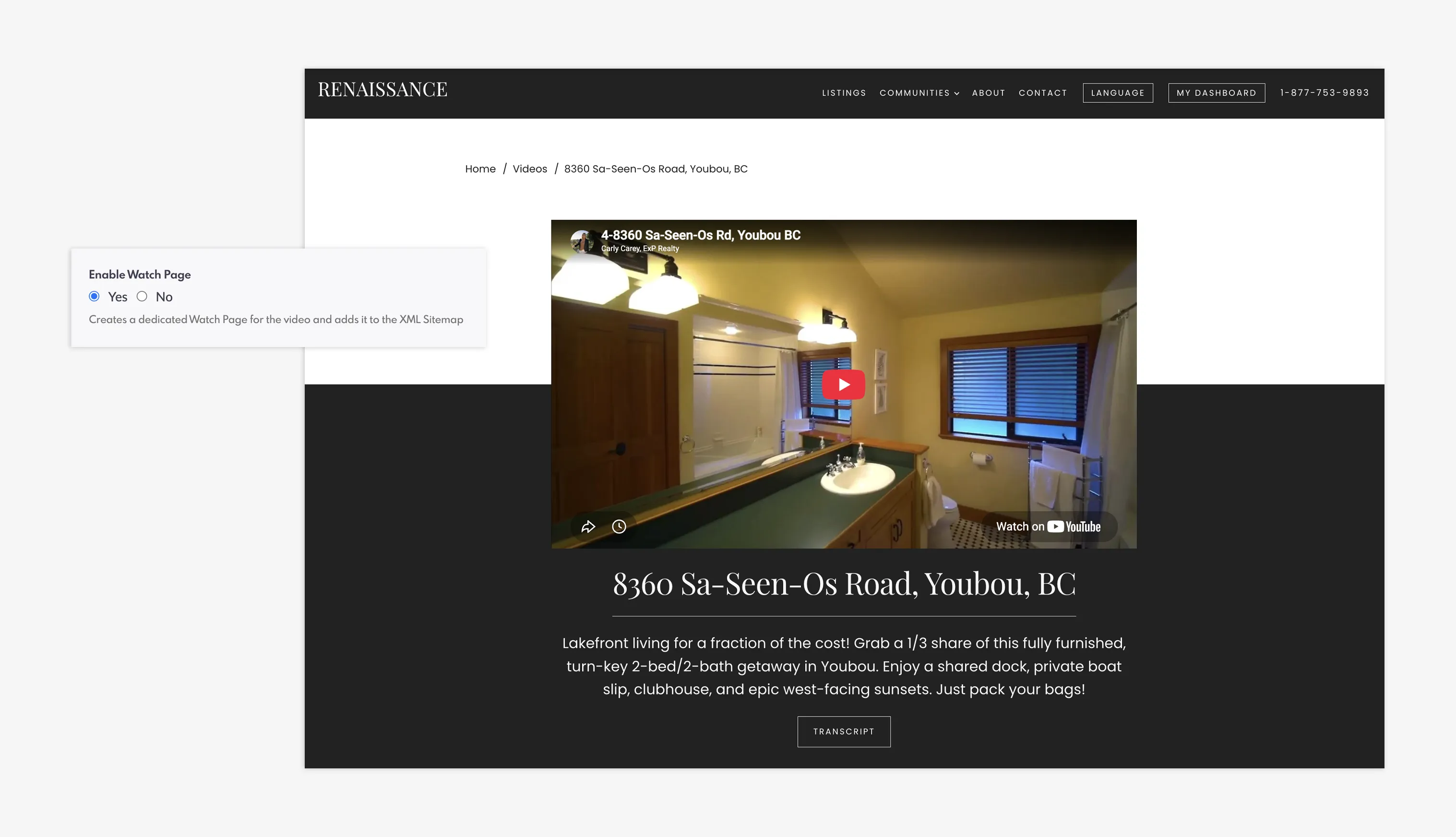
An example of a video's Watch Page when enabled
But your Watch Page also comes attached with schema markups: a technical SEO strategy that helps your content get found. By simply inputting your location details when adding a new video to the backend, NORÉ auto-generates location-based schema markup. This gives your content a significant edge in local search results, allowing you to optimize for “everywhere” without needing to be a technical SEO expert.
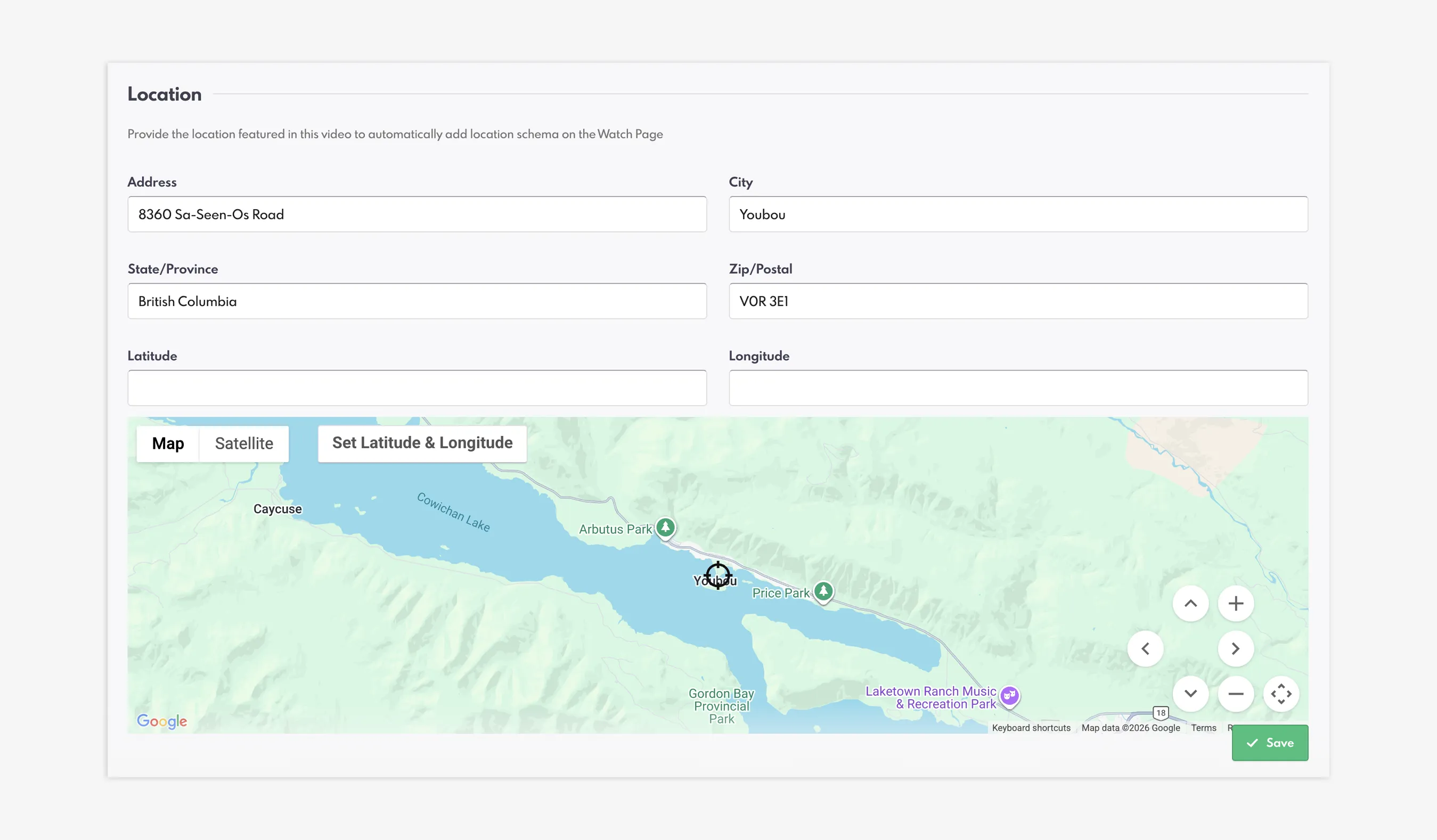
Add the location featured in your video to generate location-based schema markup
To view your Watch Page, create a new video in NORÉ. By filling out the link information and ticking "Yes" to Enable Watch Page, you can create a completely original page that is found by removing the "?video=" from your video's unique URL. For example, if your video link is yoururlhere.com/videos/?video=123-maple-street-showing, you can find your Watch Page at yoururlhere.com/videos/123-maple-street-showing.
Bringing Video Content Directly to Your Readers
NORÉ also changes the way your pages look. It comes equipped with a snippet which you can copy and paste across your website whenever you’d like to add this new video element.
When you add a new video, you’ll find the name of a snippet right underneath the name of the video. Simply add this to a CMS page, such as a blog or a community page, and it will embed your content—including the video player, buttons, and transcript. These snippets are responsive, meaning they automatically adapt to fit the layout container of your page, ensuring a seamless, high-quality design regardless of where you place them.
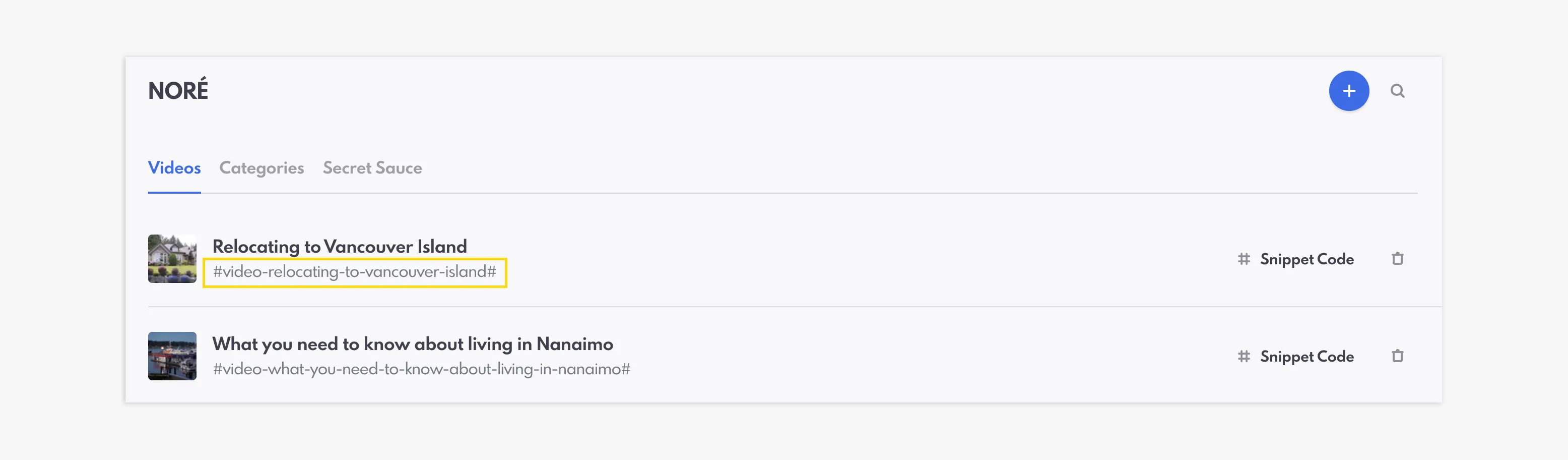
Add your video snippet codes to CMS pages and blogs
By integrating these media-rich snippets, you create a more dynamic experience for your audience, keeping visitors engaged on your site for longer.
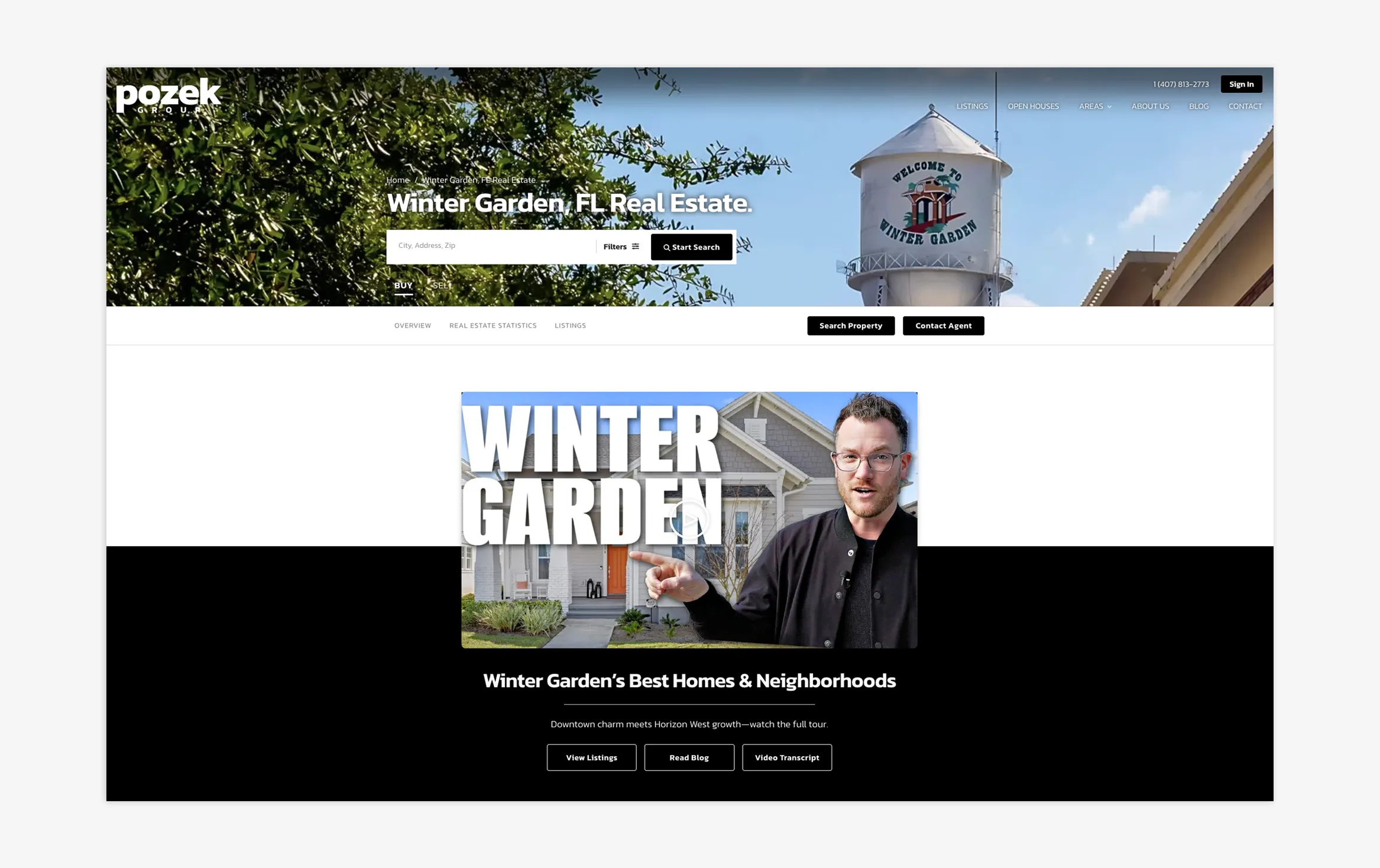
Ken Pozek from Pozek Group leveraging NORÉ's video snippet to a community page
Closing Summary
As the search landscape continues to shift toward AI-driven answers and generative engines, staying relevant means evolving your strategy alongside the technology. NORÉ provides REW clients with a competitive edge, combining powerful design elements with cutting-edge SEO tools to ensure your brand remains at the forefront of innovation. If you have a question or if you require some help with NORÉ, our SEO team is always available to assist you.
Don’t wait for the future of search to pass you by—start exploring NORÉ in your backend today and see how easy it is to elevate your digital presence.
How to use NORÉ To Rank Higher (And Make Your Pages Look Good At The Same Time) FAQs
My videos aren’t showing up on my Videos page. Why is this?
You must create at least one Category for NORÉ to work! If you have completed this step (and you have videos within the Videos tab), connect with Support and we can troubleshoot this further.
Does NORÉ host videos or can I upload videos directly to the REW backend?
NORÉ only works with videos that are hosted on YouTube or Wistia. Once you've uploaded your Video ID and transcripts from these platforms, NORÉ will be able to showcase your videos on your website and create AI-generated content based on your videos and transcripts.
Does NORÉ work with YouTube Shorts?
Yes, you can upload YouTube shorts with NORÉ. Simply input the Video ID the same way you would with a regular YouTube video.
How can I find the transcripts from my YouTube Shorts?
Replace "shorts/" from your YouTube short's URL with "watch?v=" to view your video short like a regular YouTube video (e.g. https://www.youtube.com/watch?v=videoID). Then expand the description section and click on "Show Transcript" to reveal the transcript.
What is the difference between Video Snippet Codes and Category Snippet Codes?
If you use a video's snippet code on a CMS page or blog post, it will only add that singular video. Using a category's snippet code will display the videos within that particular category (in a carousel format), similar to what you see on your videos page.
Do I need an API Key to use NORÉ?
You do not need an API Key to add videos to NORÉ. However, the AI generation section of NORÉ requires an AI key to function correctly. You have the option to use your own OpenAI API Key, or NORÉ can function alongside REWpert AI.